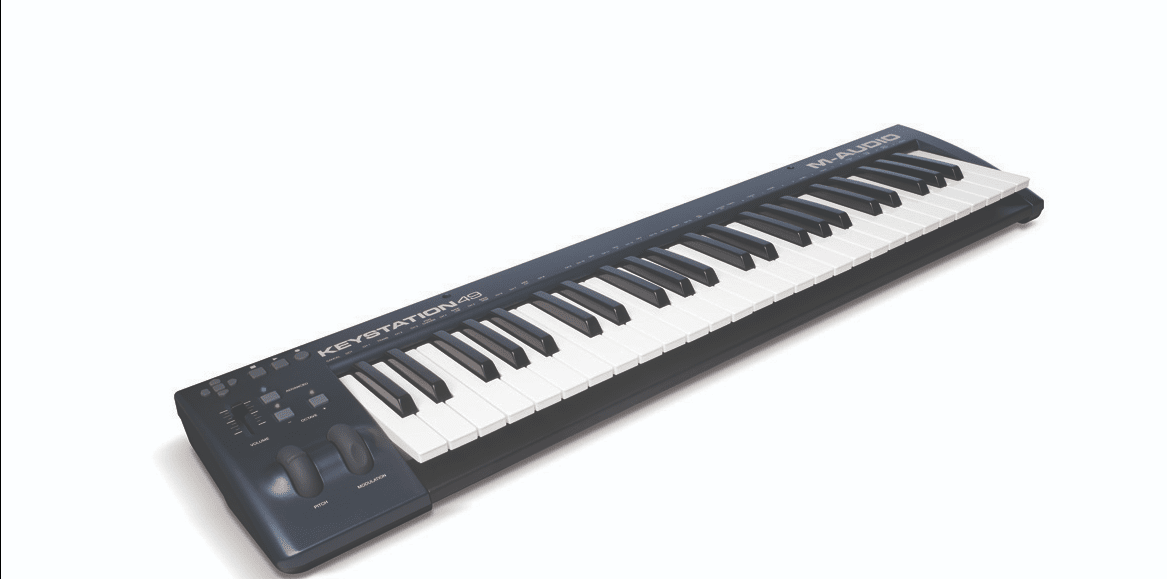
Let’s Dive In – What’s This Keystation 49 All About?
The M Audio Keystation 49 represents the most portable option in M Audio’s stripped-down MIDI controller range, offering 49 velocity-sensitive semi-weighted keys in an incredibly compact footprint that fits easily in backpacks or tight studio spaces. Perfect for electronic producers, beat makers, and travelling musicians who need just enough keys for melodies and basslines without the bulk of larger controllers, the Keystation 49 delivers straightforward plug-and-play MIDI input with pitch and mod wheels at genuinely budget-friendly pricing—though the reduced key count means compromises for anyone accustomed to playing with both hands across wider ranges.
49 full-size velocity-sensitive keys give you a surprisingly natural feel, and you get USB-powered, plug-and-play simplicity so you can plug in and play fast. It’s compact and travel-friendly, with pitch/mod wheels, octave buttons and a sustain input – handy, right? You get software like Ableton Live Lite and Xpand!2 included, so your setup sings. But it’s not an 88-key piano, so if you need full-range stuff you might feel the squeeze. Want portability or full keyboard? You choose.
Keys That Actually Feel Like Keys – My Take on the Full-Size Keys
When you play for hours, key feel matters – it shapes phrasing, timing and fatigue. The Keystation 49’s full-size keys give you a familiar surface so your hands slide into position right away. They’re velocity-sensitive, which means your soft and loud hits actually mean something in the DAW. If you want expressive MIDI that doesn’t fight you, this keybed mostly delivers.
Natural Piano Feel – Seriously, You’ll Love It
If phrasing and comfort matter to you, the Keystation’s natural feel makes a big difference – you won’t feel like you’re poking plastic. The full-size layout helps your muscle memory transfer from piano to controller fast, chords sit where you’d expect and single-note lines feel honest. It’s not a grand piano, but for writing, tracking and live rigs it gets the job done and feels good.


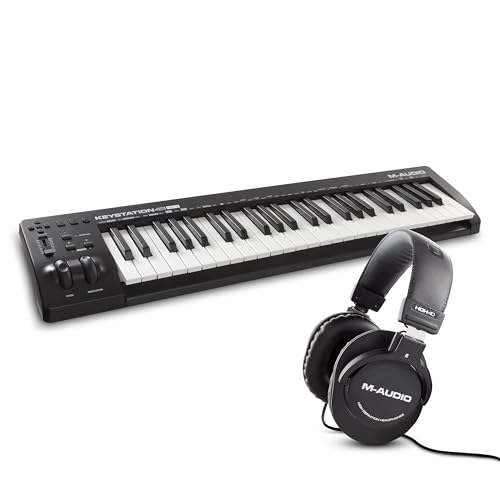
Velocity Sensitivity – Can It Get More Responsive?
You hit a key and want immediate, expressive feedback – does it follow? The Keystation’s velocity-sensitive keys catch dynamics well so accents and soft ghost notes come through; very subtle micro-dynamics aren’t blown up, which is fine for synths and sampled pianos. Want it wilder? Tweak velocity curves in your DAW and it bends to your will.
Dive deeper and you’ll find the dynamic range is wide enough for most workflows – soft passages register, hard hits snap. This isn’t a hammer-action keybed. The good news: it’s USB plug-and-play so latency isn’t a headache and you can tweak velocity curves in software to make it feel snappier.
Control Freak Alert – Why I’m Obsessed with the Total Control Features
If you hate breaking your creative flow to hunt for a mouse, the Keystation’s Total Control matters to you because it keeps everything under your hands so ideas don’t evaporate. Hands-on control keeps ideas flowing. You get transport, fader and octave access right where you play – and yes, that means fewer interruptions, faster takes, and more of your best stuff getting recorded instead of lost to fiddling around; but be careful, you can also accidentally overwrite a take if you rush.
Transport Buttons – They Make Life Easier, Trust Me
Transport buttons save you time the second you hit them – you can punch in, stop, rewind and loop without touching a mouse, which is a game changer when you want to stay in the groove. Want to nudge a take or loop a section on the fly? Instant DAW control right under your fingers. Just watch your timing though, it’s easy to hit record by accident and then curse like the rest of us.
Pitch and Modulation Wheels – Express Yourself!
You care about nuance, right? The pitch and mod wheels let you bend, wobble and color sounds in real time so your patches actually sing and breathe instead of sounding stiff. Big expressive payoff for tiny physical moves, and they sit just where your left hand expects them – ergonomic, responsive and kind of addictive.
These wheels aren’t just stickers, they’re mappable, sensitive tools – you can assign modulation depth, vibrato amount, filter cutoff, whatever gives your part emotion. Try small movements first because subtlety often wins, then go wild when the moment calls for it. Use them gently – tiny moves say a lot. And yes, you can automate the heck out of them later, but playing them live gives you that human touch you can’t fake.
Plug and Play? Yes, Please! – The Easy Setup That Won’t Drive You Nuts
Most folks assume USB controllers are a headache to set up, but with the Keystation 49 you barely break a sweat – you plug it in and get to playing. You get 49 full-size keys, transport controls and pitch/mod wheels and no drivers or external power needed on Mac/PC. It just works.
Quick, simple, and annoyingly reliable.
USB Connectivity – What’s Not to Love?
Think USB means wires and drivers galore? Not here – the Keystation is class-compliant so you just plug into your Mac or PC and it shows up in your DAW, no fiddling. You control software with the fader and transport buttons, and it’s USB-powered so no wall wart, though heavy setups might need a hub… Want simple? This is simple.
iOS Compatibility – Can You Say Awesome?
Some assume iPads can’t handle proper MIDI rigs, but the Keystation plays nice with iOS apps-yeah even on the go. You can compose and perform with your favorite apps, use the transport controls, and take advantage of the bundled software, but pay attention: the Apple to USB Camera Adapter is sold separately. That little thing is the dealmaker.
Don’t expect magic though – some iPads need the official adapter or a powered USB hub if you’re running other gear, and battery drain is real if you don’t use a powered solution. You get full MIDI control in GarageBand and third-party synths, plus bundled Ableton Live Lite and lessons to jump in fast.
Adapter or powered hub may be required.
Bonus Perks – What’s Included That’ll Get You Pumped
Some think bundled extras are just fluff, but with this controller you actually get tools that matter to your workflow. You get Ableton Live Lite, Xpand!2, MPC Beats, Mini Grand and Touch Loops plus plug-and-play USB and iOS compatibility – so you’re up and making music fast. That combo is a real shortcut to creativity.
Software Suite – Honestly, It’s a Game Changer
People assume bundled software is watered-down, but this suite punches above its weight – want real sounds and DAW power? Ableton Live Lite gives you performance and arrangement tools, Xpand!2 and MPC Beats bring thousands of presets and samples, and Touch Loops drops 2 gigs of usable loops into your account. You’ll be producing faster than you thought possible.
Free Lessons – Yes, You Heard That Right!
Think free lessons are just ad bait? They’re not – you get guided content from Skoove and app-based training from Melodics with over 60 lessons ready to go, so your first sessions actually teach you something. Want to build habits or nail a groove? This gets you there without fumbling through random YouTube vids.
Many assume those lessons only skim the basics, but Skoove’s interactive tracks walk you through fingerings and timing while Melodics gives short, focused drills that build muscle memory – practical stuff you can use at the keyboard. You can do five minutes or an hour, fit it around your day, and get feedback as you go. They actually help you play better.