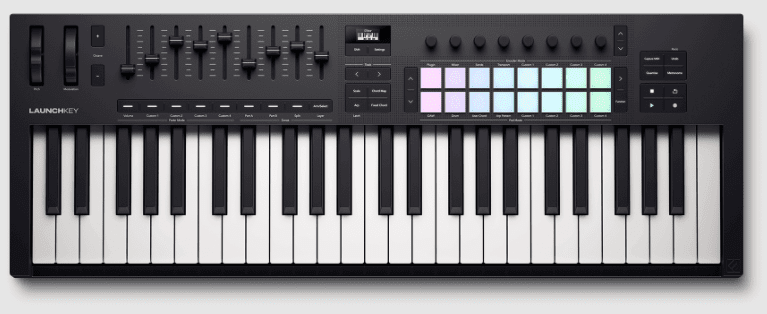
What’s the Lowdown on the Novation Launchkey 49?
Ever wondered if a 49-key controller can actually feel like an instrument and spark real ideas? As someone who’s played piano for years, I can tell you the Launchkey 49 lands where it counts – semi-weighted waterfall keys that make you play, pads that respond, and encoders you actually use.
It feels like an instrument, not a gimmick.
Does it replace a grand? No. But it gets your ideas down fast, keeps you in key, and makes your DAW feel less like a maze and more like a studio you can play.
Why You Need This Controller in Your Life
I had a two-hour window to finish a soundtrack and the Novation Launchkey 49 turned that panic into a track. With four octaves of semi-weighted keys, responsive pads and hands-on encoders and faders you get an instrument-like feel that lets your hands do the thinking. Want to stop fiddling with menus and get into the groove? This is the controller that pushes your ideas forward.
It’s Got Serious DAW Integration
During a late-night mix I set up the Launchkey with Ableton, Logic and Cubase and could flip between plugin, mixer and transport in a heartbeat. It maps cleanly to major DAWs so you actually play instead of clicking – transport, clip launching and parameter tweaks all at your fingertips. You’ll work faster, stay focused and keep the flow going.
Built-in Creative Tools That Spark Ideas
I once got stuck on a dull progression and the Creative Chord mode rescued the session, pushing me into fresh territory instantly. Scale, Fixed Chord and Chord Map mean you can jam without hitting a bum note, and the OLED keeps you oriented so you stay creative, not lost. Try it and you’ll see how quick ideas appear.
I kept noodling until the arpeggiator and chord tools started writing parts I actually wanted to keep. The arpeggiator is flexible, the three chord modes free you from boring harmony, and the 16 velocity pads with poly aftertouch add real feel. Layer keys, split zones, store custom encoder/fader modes and use the bundled plugins to finish a track without leaving the controller. It really speeds up songwriting.


My Take on Those Pads
Compared to the rubbery pads on older controllers, the Launchkey’s 16 feel surprisingly alive. As a keyboardist, you get velocity and polyphonic aftertouch so your finger pressure actually shapes the sound, which is perfect when you want nuance without changing instruments. They light up, respond fast and don’t feel like cheap buttons. Want punchy drums or subtle chord swells? You can do both.
How They Feel When You’re Jamming
Unlike stiff pads that kill the groove, these sit right under your fingertips when you’re jamming. They’re responsive, have a nice rebound and velocity is consistent – sometimes they feel a touch springy but that helps with fast rolls. You can trigger clips and play drums without breaking the flow, right? They keep you in the pocket.
Getting Expressive with Polyphonic Aftertouch
Compared to velocity-only setups, polyphonic aftertouch lets you speak with each finger on the pad. You press in and add bends, vibrato or subtle swells to individual notes and it opens up textures you didn’t know were there. It’s expressive. If you play like I do, you’ll find new colors fast.
Unlike channel aftertouch that affects everything, polyphonic aftertouch reacts per pad or note so you can shape individual voices. In your DAW map it to filter cutoff, vibrato depth or dynamics – assign it to synth layers and suddenly pads breathe and basses sing. Small pressure changes make a big difference. Want more control? Tweak sensitivity and curves.
Are the Keys Worth It?
You’re up at 2am sketching a chorus on your laptop and need something that feels like a piano but won’t eat your desk. The 49 semi-weighted, waterfall-style keys give you four playable octaves that actually invite expression – they sit between synth-slick action and heavy hammer feel so your dynamics come through without tiring your fingers. If you’re after a compact controller that still feels musical, these keys are more than serviceable; they inspire ideas, and that’s what matters when you’re in the zone.
The Feel of Semi-weighted Keys
You’re swapping from an upright to the controller mid-rehearsal and notice the difference right away: the semi-weighted action gives a bit of resistance so your playing doesn’t feel floaty, but it’s not piano-heavy – so fast runs and synth stabs stay clean. Velocity response is honest, pads and arpeggiator respond, and after a few minutes your fingers forget it’s not a real piano. Want nuance without lugging a grand? This is the compromise that actually works.
Layering and Splitting Like a Pro
You’re building a live patch where bass needs to sit under airy pads and a synth lead lives on top – so you split the keyboard and layer instruments across channels. The controller lets you zone two MIDI channels or stack sounds across the full range, which means you can play basslines with your left hand and lush chords with your right, or trigger a lead over everything, all without touching your mouse. It’s a simple workflow that makes your arrangements feel bigger instantly.
You’re mid-set and hit a section where bass, pad and a lead all need tweaks fast; set the left zone to channel 1, right to channel 2, and map encoders to filter and reverb so you don’t fumble. Save custom modes, recall them between songs, and use the pads for drums or clip launching – the hands-on control lets you sculpt layers on the fly, and your performance ends up tighter because you’re playing, not clicking.
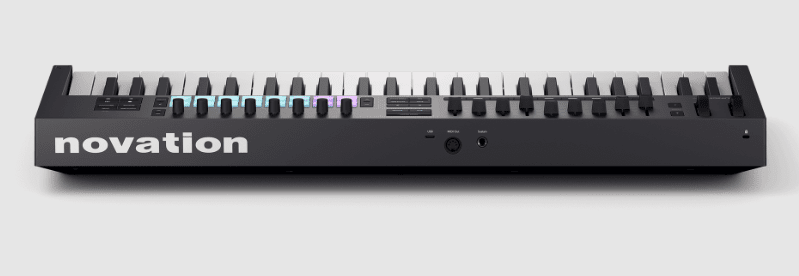
What About the Faders and Encoders?
Surprisingly, the faders and encoders feel more like instruments than peripherals – they respond with the kind of resistance you expect from studio kit, not cheap plastic toys. You can grab a track’s vibe fast, sweep a filter, or lock in a mix without squinting at the screen. They’re tight, tactile and mapped intelligently to your DAW so you actually want to use them. After a few sessions you’ll be flying through mixes, no mouse required.
Hands-on Control That’s Actually Fun
Oddly, control can be fun again – those eight endless encoders and nine faders invite you to play, twist and nudge in ways that spark ideas. You get immediate feedback, the OLED helps you see mappings, and the pads/keys respond so it feels like jamming not editing. Want tactile automation? Go for it. You’ll find your workflow loosens up and tracks get character faster.
Custom Modes to Make Your Workflow Smooth
Surprisingly, you can stash four totally different control layouts right on the hardware so you switch contexts in a heartbeat, which saves tons of faffing about. Assign faders to mixer one minute, then map them to plugin parameters the next – instant recall. It’s like carrying multiple control surfaces in a single box. So your sessions stay fluid and you’re less likely to break a creative streak.
Surprisingly, the faders can send notes, MIDI CCs or program changes – not just channel levels. Instant recall is a game changer. You can save four of these setups, recall them mid-set, map sends, plugin params, or even alternate key zones, so you don’t have to stop playing to rewire control. Try mapping a synth’s filter to an encoder, a pad to a sequence, then flip to mixer mode and keep playing – it’s that seamless.
FAQ
Q: How does the Novation Launchkey 49 feel to play – are the keys any good for piano-style playing?
A: The feel matters because if the keys don’t sit right under your fingers you won’t play for long, and that kills creativity fast. The Launchkey 49 uses four octaves of semi-weighted, waterfall-style keys which give you more bite than cheap synth keys but they ain’t a full grand piano action – and that’s fine, most of us want expressiveness and speed not a dead-weight hammer action. The semi-weighted action is great for fingered piano parts and synth lines alike, it responds well to dynamics and the waterfall edge makes glissandos and fast runs feel natural. It’s not heavy, so you can play long sessions without fatigue. It also lets you split zones and layer two MIDI channels – handy if you wanna run a bass patch with your left and a piano with the right, or layer pads underneath. If you want full acoustic piano realism you’ll miss a hammer action, but if you want a playable, musical keyboard that keeps up with modern studio workflows – this is very satisfying.
Q: Does the Launchkey 49 actually speed up my DAW workflow or is that marketing hype?
A: This matters because time in the studio is precious and anything that keeps you off the mouse saves creative momentum – that’s the whole point of a controller. The Novation Launchkey 49 integrates tightly with Ableton Live and has presets for Logic, Cubase, FL Studio, Reason, Bitwig and more, so once you set it up you can flip between mixer, plugin and transport controls without hunting menus. Hands-on controls are legit useful – nine faders, eight encoders, and quick mode switching means you can tweak synth parameters or mix levels in real time. And the custom modes let you store setups for different projects – so you don’t have to remap stuff every time. Sometimes the MIDI mapping isn’t perfect out of the box for niche plugins, but it’s easy to reassign. Use the OLED to confirm what encoder is doing and you’re golden – no guesswork. It actually speeds things up – especially in Ableton Live where the Launchkey’s session and clip control keep ideas flowing.
Q: Are the pads, arpeggiator and chord/scale tools just gimmicks or do they help songwriting?
A: This matters because if a controller gives you smart tools that spark ideas you write more music – simple as that. The Launchkey’s 16 velocity-sensitive pads with polyphonic aftertouch are great for drums and fingered chords, and the three Chord Modes plus Scale mode are terrific for sketching progressions when you’re stuck. Want to jam in key and not fight the theory? Use Scale mode and it locks the notes so you can’t go wildly off – perfect for quick ideas or when you’re tired. And the arpeggiator is actually musical – it’s not just a flashy add-on, it generates evolving patterns you can tweak on the fly. Pads feel responsive and are good for finger drumming, though if you’re a hard-hitter you might miss the thump of high-end MPC pads. For songwriting though, this combo of pads, arps and chord tools gets ideas down fast and keeps you inspired. If you want a sketchpad that nudges you toward interesting parts – this one does that job well.
Final Thoughts
This is an accessory that is worth serious consideration, especially at this price point.