
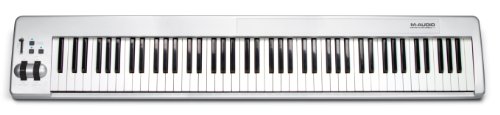
The M Audio Keystation 88 represents one of the most affordable ways to get a full 88-key MIDI controller for music production, offering semi-weighted keys with aftertouch in a straightforward design that strips away fancy features to focus purely on getting notes into your DAW. Popular among bedroom producers, composers, and pianists who primarily work with software instruments, the Keystation 88 delivers basic functionality and portability at prices that often undercuts competitors.
Any time you’re picking an 88-key controller the feel and workflow matter to you, especially if you’re juggling virtual instruments and live gigs, and the Keystation 88 promises that with semi-weighted keys, pitch/mod wheels, sustain input and plug-and-play USB power. So does it give you real piano-like control without fuss? You’ll get a slim, stage-friendly layout, useful controls and a hefty software bundle to jumpstart production, and yeah, it won’t empty your wallet.
Why I’m Loving the M Audio Keystation 88 MK3
This is the easiest, most playable 88-key controller you’ll use at this price. You get a surprisingly authentic keybed, responsive controls, and a slim layout that slips onto your desk without fuss – it’s the kind of gear that makes you want to play, and keep playing.
Full-Size Keys that Feel Real
When you press the semi-weighted, velocity-sensitive keys they respond like a proper piano – not toy-like, not mushy. You can shape dynamics, pull off expressive runs and use the sustain pedal input for real legato; it’s tactile, predictable and actually fun, so your timing and phrasing improve without fighting the keyboard.
Plug-and-Play Simplicity
Plug it into USB and you’re off – no drivers, no bulky adapter, no faffing about. You can connect to Mac, PC or iOS with an adapter, the unit is USB-powered and class-compliant so your setup stays clean and fast, which means less time configuring and more time making music.
Because it’s class-compliant and USB-powered, you can move between studios or stages without tweaking settings, and the included Ableton Live Lite and MPC Beats get you composing straight away. Want hardware control over your DAW? You’ve got a volume fader, transport buttons, octave switches and assignable controls so you don’t reach for the mouse.
This thing actually speeds up your workflow.
And yeah – connecting to iPad is possible with the Apple camera adapter, so you can sketch ideas anywhere.


What Makes This MIDI Controller Stand Out?
Essential Controls at Your Fingertips
You might assume an 88-key controller is only about the keys, but the Keystation 88 MK3 proves it’s about hands-on workflow – not menu diving. You get tactile hardware that keeps you in the moment, so you actually play instead of pointing and clicking. Want quick tweaks or expressive bends on the fly? The built-ins make it painless.
- Volume fader
- Transport & directional buttons
- Pitch and modulation wheels
- Octave up/down buttons
- Sustain pedal input
After a quick tweak you’ll be navigating, shaping and performing without touching your mouse.

Super Convenient for Live Performances
Some folks think an 88-key board is a stage anchor that’s a pain to lug around – not the M Audio Keystation 88 MK3, it’s slim and surprisingly portable, you can toss it in a gig bag and head out. USB-powered, plug-n-play, and built to sit neatly on any desk or stage setup, it gets you on and off stage fast – no fuss, no extra PSU, just music. How nice is that?
Other people worry USB-powered gear won’t survive the demands of live shows, but this one holds up – class-compliant USB-MIDI, optional 5-pin MIDI out, and iOS support mean you’re covered whether you use a laptop, tablet or vintage synth. It just works. And because you’ve got octave buttons, pitch/mod wheels, a volume fader and a sustain input right there, you can adapt mid-set, tweak sounds and trigger clips without breaking flow. It’s simple, reliable and made for real world gigs – set it up, map controls and play.
The Software Bundle – Is It Worth It?
Exploring Ableton Live Lite and More
Lately you see more controllers shipping with decent software packages, and the Keystation 88 follows that trend with Ableton Live Lite, MPC Beats, Mini Grand, Velvet, Xpand!2 and a stack of sample kits. You get a playable DAW environment and instant sounds, so you can sketch ideas, perform and record without fuss. Does it replace a full studio? Not really, but it gets your tracks moving fast and that’s handy.
My Thoughts on the Additional Production Tools
The extra tools actually matter – Mini Grand and Velvet give you usable keys, Xpand!2 covers quick pads and leads, and MPC Beats plus the kits will kickstart beat ideas. If you’re starting out you’ll feel set up; if you’re picky you’ll replace some stuff later, no biggie. Overall the bundle nudges the Keystation from a keyboard into a ready-to-go mini studio.
You can sketch full demos with what’s included, track MIDI, tweak sounds and export stems, no fuss, the controls map cleanly so you actually play instead of hunting menus. The sample packs are hit-or-miss but will spark ideas; you’ll toss some, keep others, and when you want more depth you add third-party plugins.
Worth it? Mostly, yes.

Final Thoughts – Is This the Right Choice for You?
Who Should Grab This Keyboard?
I handed the Keystation 88 to a friend who needed a full-range controller for late-night beat making and he started playing like it was a grand – immediate vibe. If you want 88 full-size semi-weighted keys without breaking the bank, if you mostly work in-the-box with virtual instruments, or if you gig light and need USB power, this is for you. Want real hammer action piano-feel? Maybe not. But for producers, composers and students – solid pick.
Any Downsides to Consider?
Once I tried to do a piano-only set with just this and I missed the heavy, weighted touch – and yeah, no onboard sounds meant I had to haul a laptop. The keys are semi-weighted, there’s no aftertouch, and physical controls are basic – pitch, mod, a fader and transport. If you need deep hands-on control or authentic acoustic feel, you might feel limited.
I was in a studio session where subtle pedal work and real weighted response mattered and the Keystation showed its limits – it’s built for MIDI control, not for replicating a concert grand. The assignable controls are handy but you won’t get dozens of knobs to tweak every plugin; mapping is simple, not exhaustive. USB power is convenient but some iOS setups need an adapter or powered hub. On the plus side you do get 5-pin MIDI out and a solid software bundle – so if your workflow is DAW-centric and you value portability over premium key action, you’ll be fine. If you’re after expressive, piano-grade dynamics or extensive hardware control, look elsewhere.
Wrapping Things Up
The M Audio Keystation 88 serves perfectly well for producers and composers who need full 88-key range for software instruments without demanding authentic piano feel or premium build quality. If you’re primarily triggering virtual instruments, composing MIDI sequences, or need an affordable full-size controller for your home studio, the Keystation 88 delivers excellent value—but serious pianists accustomed to properly weighted keys will find the semi-weighted action frustratingly light and unresponsive compared to controllers costing significantly more.