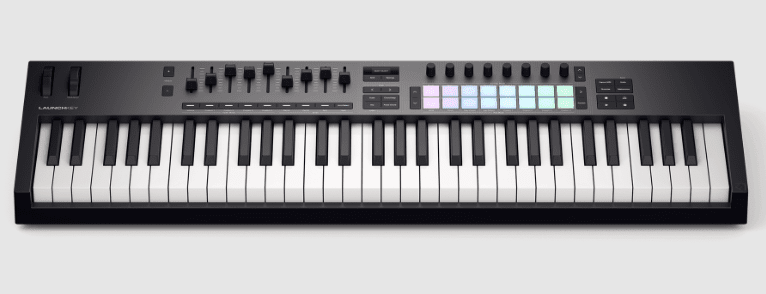
Let’s Dive In: An Overview of the Launchkey 61
Compared to bulkier, piano-style controllers, the Novation Launchkey 61 feels like a hybrid – five octaves you can actually perform on; if you play keys you’ll love the waterfall action, and the pads and hands-on controls spark ideas. You’ll get 61 semi-weighted keys, 16 velocity pads, eight endless encoders and nine faders, plus scale and chord modes shown on the OLED so staying in key’s easy. Want to sketch a hook fast? Plug it in, map it to your DAW (Ableton, Logic, FL etc) and let the arpeggiator and pads do the heavy lifting.
What’s in the Box?
Surprising part – the big, five-octave feel comes in a box with just the Launchkey 61 and a USB-C-to-A cable, but that’s all you really need to get going. You pull it out, plug it into your laptop and the pads, faders, encoders and OLED are instantly ready to play. It’s bus-powered, so you skip a bulky power brick – neat for gigs and cramped studios.
Unpacking the Essentials
The first thing you notice isn’t the keys but the tactile pads and endless encoders, which is kinda refreshing. Inside the box: the Launchkey 61 and the USB cable – simple and no-nonsense. You get a solid, road-worthy controller that feels like an instrument, pre-wired for instant DAW control and performance.
The Software Bundle Scoop
Oddly enough, the software you get can be more of a game-changer than the hardware itself. The package includes a pro-grade software bundle – plugins, samples and DAW-ready tools – so you can actually make tracks straight away without hunting for sounds. You’ll thank whoever packed it when inspiration hits.
The software side plugs straight into major DAWs and comes with presets and templates mapped to the Launchkey’s pads, faders and encoders, so you won’t waste time mapping MIDI. It’s geared to get you from unboxing to sketching ideas fast – sketch, tweak, record – and the included instruments and sample packs give you enough sonic variety to start producing immediately.
Product offers are temporarily unavailable.
Why I Think This Controller is a Game-Changer
You’re up at midnight, finishing a track after a long piano session, and the Launchkey just slots into your workflow – five octaves that feel familiar, pads that hit like drum heads, and hands-on encoders so you can bend a mix without hunting menus. It moves between playing and producing and it actually speeds things up, not slows you down. It feels like an instrument, not a controller.
DAW Integration That Just Works
You’re swapping projects between Ableton and Logic and you want control now, not later, and the Launchkey answers – custom scripts for major DAWs, HUI fallback for the rest, direct transport, track nav and device control that actually maps how you think. So you stop clicking and start playing, hands on faders, pads launching clips, no weird surprises. Who’s got time for menu diving anyway?
Killer Creative Tools to Unlock Your Potential
You’re stuck on a bland chord loop at 2am and need a spark – Scale and Chord modes plus the OLED make staying in key painless, the arpeggiator gives motion and the pads invite weird rhythms, fast. It nudges you into ideas you wouldn’t have hit at the piano alone, and yeah, it feels like cheating sometimes but in a good way – inspiration on tap.
You’re programming a syncopated arpeggio or building a split patch and you want nuance – the generative arpeggiator with step editor, Chord Map/Fixed/User Chord options, Split/Layer zones and 30 built-in scales give you that depth. Pads with polyphonic aftertouch add expression, and Capture MIDI/Undo/Quantise keep you fearless when experimenting. It all stacks together so your keyboard playing translates into real, usable parts fast. It’s ridiculously playable.
Product offers are temporarily unavailable.
The Real Deal About Those Pads and Keys
You know those midnight sessions where you hunt for a groove and your controller either inspires you or kills the vibe? The Launchkey 61’s five-octave semi-weighted, waterfall keys give you real playing comfort and enough range to sketch full arrangements, while the 16 velocity-sensitive pads make beats and clips feel immediate. You get tactile expression without fuss – it’s more like an instrument than a MIDI box, and that changes how you write.
The Keybed Experience
You sit down after a gig and want something that responds like a real instrument, not a game controller. The semi-weighted waterfall keys on the Launchkey 61 have a springy but grounded feel, good for flowing piano lines and fast synth runs, lots of dynamic range so your velocity matters. And with zones, split and layer options you can get creative – play bass and pads without reaching for another keyboard.
Pads That Make You Want to Play
You tap a beat at 2am and it clicks immediately – that first hit’s important, right? The 16 RGB pads have velocity sensitivity plus polyphonic aftertouch, so your finger dynamics and pressure shape the sound, whether you’re finger-drumming or launching clips. They’re responsive, loud when you need them and nuanced when you don’t, so you actually want to jam rather than tweak parameters forever.
You flip through pad pages mid-session and the pads keep up, no lag, no surprise – they map cleanly to clips, drums, chords or custom modes. They also support scene launch and user pages so your live sets and studio sketches flow without hassles. They feel alive. Because the aftertouch and velocity curves are solid you can pull expressive rolls and ghost notes that really sell a groove.
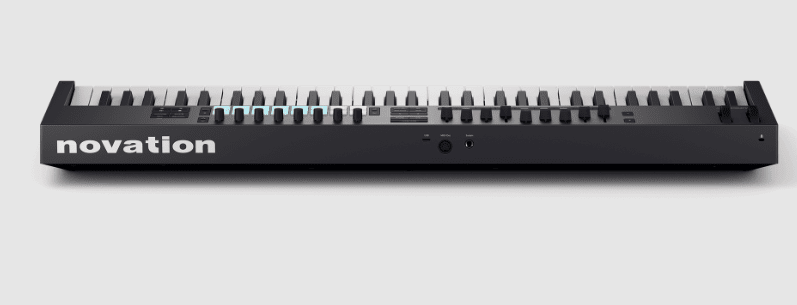
Specs and Connections: Are They Up to Snuff?
Want to know if the Launchkey’s specs actually hold up when you plug in and play? You get 61 semi-weighted keys, 16 velocity pads with polyphonic aftertouch, eight endless encoders, nine faders and a clear OLED – it’s built like an instrument, not a toy. USB-C, 5-pin MIDI out and a sustain jack cover the basics, it’s bus-powered so you can run things off your laptop, and that bundled software makes it feel pro right out the box.
What You Need to Know About Connectivity
Curious whether the ports will fit your rig? USB-C and a 5-pin MIDI out mean you can go modern or classic, and a sustain 1/4” jack plus Kensington lock give you stage-ready options; a USB type C-to-A cable is included so you won’t be stranded. It’s bus-powered so power supplies aren’t part of the package, and custom DAW scripts or HUI make integration with your setup pretty painless.
Size Matters: Dimensions and Power Requirements
Wondering if this thing will squeeze into your gig bag or studio nook? At 895 x 263.5 x 93mm and 4.78kg it’s roomy – five octaves deserves space – so it’s portable if you carry light but not something you’d toss in a backpack. You get plenty of real estate for hands-on control, but plan your case or stand accordingly.
Worried about powering extra gear on stage or in the studio? It’s USB bus powered so you just plug into your laptop – no PSU in the box – but if you’re running lots of USB devices or long cables you might want a powered hub. At 895mm wide it needs space; protective case or flight case? Yep, a good idea if you travel a lot.