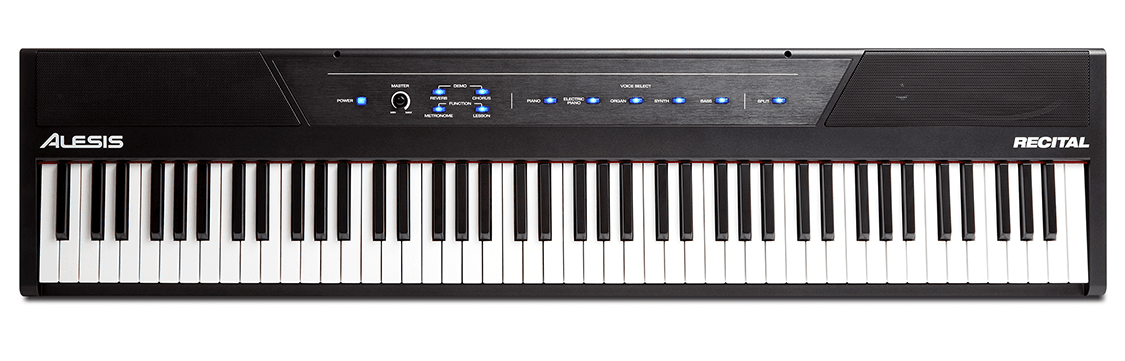
The Alesis Recital 88 key digital piano positions itself as one of the most affordable full-size options for beginners, promising weighted keys and essential features at prices that undercut established brands by hundreds of pounds. This aggressive pricing strategy raises legitimate questions about whether Alesis delivers genuine value through efficient manufacturing or creates false economy with compromised key action, inadequate speakers, and durability issues that cost more in frustration and premature replacement.
This honest review examines the actual playing experience, sound quality, and build reliability of the Alesis Recital to determine if this budget digital piano represents smart entry-level investment or a purchase you’ll regret within months of consistent practice.
Just when you need a versatile home instrument, the Alesis Recital Home Digital Piano puts 88 full-sized semi-weighted keys, intuitive Lesson Mode, and USB‑MIDI connectivity at your fingertips, plus an included stand, triple-pedal unit and software trials. Its powerful 20‑watt built-in speakers deliver impressive volume-take care: high volumes can risk hearing damage-while split/layer voices and reverb give your practice real expressive depth.
Sleek Style Meets Exceptional Sound
The Alesis Recital Home combines stunning modern styling with an authentic playing experience, giving you a full-sized 88-key instrument that fits your living space and performance needs. Its adjustable touch response, layered voices and 20-watt built-in speakers deliver rich tone, though the speakers can reach high volume so you should manage levels for safe listening. This balance of form and function makes it a true conversation starter.


Digital Home Electric Piano Overview
You get 25 built-in sounds from acoustic to synth, with Layer and Split modes to shape your tone and teach or perform with flexibility. Lesson Mode lets you and a partner share the keyboard, while USB-MIDI and stereo RCA/aux connections give plug-and-play access to recording and apps. The bundled stand, three-pedal unit and power adapter mean quick setup; note that battery power requires six D cells (not included).
Conversation Starter Design
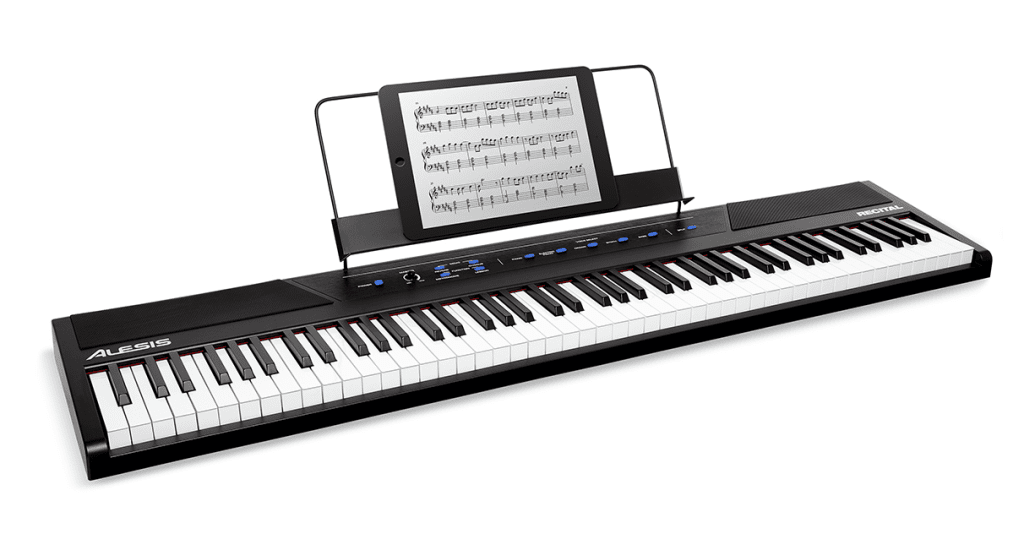
With a sleek black finish and clean lines, the Recital Home is a conversation starter designed to be a centerpiece in your room; its compact footprint and included wooden stand help it integrate seamlessly. The aesthetic is paired with practical touches-an illuminated control panel and tablet/music rest-so your instrument looks as impressive as it sounds. Be aware that a full 88-key layout takes floor space, so plan placement accordingly.
The design also prioritizes connectivity and practice: dual headphone jacks mute internal speakers for private sessions, while stereo RCA, 1/8″ aux and USB-MIDI let you link to amps, phones and learning apps. The illuminated touch controls and adjustable touch sensitivity give you immediate tactile feedback, and the included three-pedal unit adds expressive possibilities. Note the portable power option using six D cell batteries (not included).
Full-Sized Piano-Style Keys
You get an authentic feel from the Alesis Recital’s 88 full-sized piano-style keys, delivering realistic range and presence for practice and performance; the graded action and 20W speakers project a convincing tone. Whether you’re learning or gigging, the layout supports full repertoire and expression. Use headphones for private sessions and keep volume moderate to protect your hearing.
Graded Hammer-Action Weighted Keys
The Recital’s graded hammer-action weighted keys mimic an acoustic grand by offering heavier resistance in the low end and lighter touch in the high end, helping you develop dynamic control and finger strength. This tactile realism makes your phrasing, articulation, and pedaling translate naturally, so your technique improves whether you practice at home or perform.
Adjustable Touch Sensitivity
You can tailor key response with multiple touch sensitivity settings so the piano matches your playing style-light for fast, delicate passages and heavy for robust classical touch. Adjusting sensitivity enhances expressiveness and pairs well with layered voices; however, very sensitive settings at high volume can produce sudden loud output, so protect your hearing by keeping headphone and amp levels safe.
Change sensitivity easily from the illuminated control panel and test settings with different voices to find what fits your hands and repertoire; lighter modes suit beginners and small hands, while heavier modes build technique for advanced pieces. When teaching in Lesson Mode, match sensitivity for balanced feedback, and avoid prolonged max volume to prevent speaker strain and hearing damage.
Inspiring Sound Library
The Recital gives you an expansive, performance-ready palette with 25 built-in sounds spanning acoustic and electric pianos, organs, strings and more, plus adjustable Reverb and Chorus to shape tone. With 20W built-in speakers and 128-note polyphony you get rich, realistic playback – but be aware that playing at very high volume or with loud external amplification can damage your hearing and risk speaker distortion.
Built-in Sounds
You can switch between faithful acoustic and electric pianos, organs, synths, strings and bass for studio or stage use; each voice responds to your touch sensitivity settings for dynamic expression. The onboard effects let you tailor ambiance, and dual headphone outputs let you practice privately-use care with headphone volume since prolonged loud listening can harm your hearing.
Layer and Split Functions
The Recital’s Layer mode blends two voices for a fuller, orchestral feel while Split assigns different voices to left and right hands for duet or accompaniment setups, ideal for performance and teaching. These modes enhance creativity but can produce a dense mix or strain polyphony if you stack complex tones, so manage effects and levels to avoid muddiness or note dropout.
When you layer or split, you should balance volumes and adjust Reverb/Chorus to keep clarity; layering doubles voice processing and consumes more polyphony, which may cause notes to drop if you play dense passages. Use Split for duet lessons or bass/chord separation and Layer for solo textures, and monitor output levels to prevent clipping or unintended speaker strain.
Complete Accessory Bundle Included
Your Recital Home arrives with a full accessory set: an easy-to-assemble wooden keyboard stand, a sheet music/tablet stand, the power adapter, and a 3-pedal unit that simulates soft, sostenuto, and damper/sustain pedals. These additions give you a ready-to-play setup and excellent value, but ensure your stand is level and secure to avoid instability or tipping.
Assembly of Wooden Stand
You can assemble the wooden stand with basic tools and the included hardware; follow the instructions to align panels and tighten fasteners evenly. For safety, tighten screws securely, check for wobble, and consider a two-person lift when mounting the keyboard to prevent strain or dropping the instrument.
Additional Components
The tablet/music rest clips onto the top for easy viewing, the 3-pedal unit connects to the sustain input to unlock expressive control, and the power adapter powers the piano without batteries. Keep your connections firm and position the pedal so it won’t slide during play for reliable performance.
Pay attention to cable routing and placement: use only the included power adapter to match voltage and polarity, route pedal and power cables away from foot traffic to prevent tripping, and set the pedal unit on a non-slip surface so your expressive techniques aren’t interrupted by movement or loose connections.
Easy-to-Use Illuminated Touch Control Panel
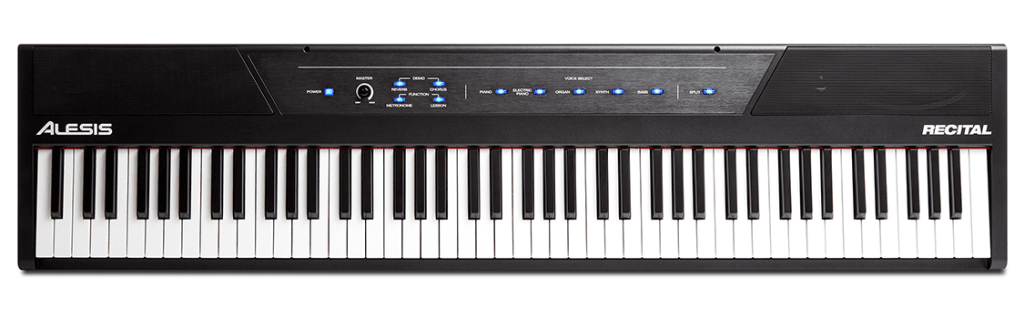
The illuminated touch control panel puts every important setting within reach so you can focus on playing; its backlit buttons and logical layout make switching voices, adjusting FX, or engaging Lesson Mode instantaneous. You get responsive touch for fast changes, though the sensitivity means you should be mindful that controls can be bumped accidentally during energetic playing.
Built-in Metronome
The Recital’s built-in metronome lets you lock in timing with adjustable tempo and a convenient tap tempo, spanning 30-280 BPM for slow practice or faster drills. It’s ideal for improving consistency and pace, but note that it won’t automatically sync with external apps without proper MIDI or DAW setup.
Transpose Feature
The transpose control lets you shift the entire keyboard from -12 to +12 semitones directly from the panel, so you can match singers or play in alternate keys without relearning songs; it’s fast and immediate for live adjustments. Keep in mind that transpose changes affect both audio and MIDI output, so check settings before recording or performing.
When you use transpose, you can easily accommodate vocal ranges, simplify accompaniments, or play along with recordings in different keys-simply step by semitone up or down from the panel. If you rely on USB-MIDI or are recording, be aware that the transpose persists across sessions and will alter the pitch of recorded MIDI/audio until you reset it to zero; to avoid mismatched tracks or surprises in post-production, always confirm your transpose setting before capturing or exporting sound.
Lesson Mode
Lesson Mode divides the 88 keys into two identical zones, letting you and an instructor sit side-by-side and play the same part at the same pitch and voice so you can observe and mimic without reaching over one another; use headphones for quiet practice and keep volume at safe levels to protect your hearing.
Dual-Zone Functionality
The dual-zone setup splits the keyboard into two 44-key areas with identical pitch and voice, enabling parallel practice, guided repetition, and easy comparison between your parts; this works seamlessly with recording or educational software for tracking progress.
Student-Teacher Collaboration
The layout lets your teacher demonstrate directly beside you while you mirror fingerings and dynamics in real time, making corrections immediate and intuitive; the Recital also offers two headphone outputs that mute the internal speakers, so you can run private lessons without disturbing others.
For deeper practice, use the Recital’s USB-MIDI connection with included lesson services-Melodics and a trial of Skoove-to record, review, and reinforce lessons; these tools combined with Lesson Mode give you structured feedback and flexible teaching options.
Consider An Extended Warranty For Your Instrument
USB Connection
The Recital’s USB port gives you a plug-and-play MIDI and audio connection to Mac/PC so you can record, run virtual instruments, or use lesson apps with minimal setup; it pairs directly with DAWs and the included Skoove and Melodics trials. Be aware that USB does not power the piano-use the included adapter or batteries-and a high-quality cable helps prevent dropouts during sessions.
Plug-and-Play Functionality
When you plug the Recital into your computer it is often recognized without drivers, letting you start lessons or record quickly; you may need to select the keyboard as your MIDI/audio device in your software. If you encounter high latency, lower your audio buffer size or use a dedicated audio interface to tighten timing for practice and tracking.
Educational Software Compatibility
The Recital works with standard MIDI-compatible apps and comes with trials for Skoove and Melodics, so you can begin interactive lessons immediately. It also supports virtual instrument plugins and DAWs on Mac/PC, but check your app’s MIDI/audio settings to ensure proper input routing and monitoring.
For best results you should set your DAW or lesson app to the Recital as the MIDI input, enable the full 88-key MIDI range, and match sample/buffer settings to reduce latency; use headphones for precise listening but avoid excessive levels because prolonged loud sound can damage your hearing. If audio over USB isn’t available in your setup, route audio separately via the Recital’s outputs or a dedicated interface.
Well Connected
You get a versatile I/O suite on the Recital Home so you can integrate it into studios, classrooms, or your living room: 1/4″ stereo outputs for amps, RCA/1/8″ aux input for phones or tablets, USB‑MIDI/audio for computers, plus pedal and power options-giving you flexible recording, playback, and amplification without fuss.
Stereo Outputs and Inputs
Your Recital Home offers a 1/4″ stereo out to feed mixers or amplifiers and an 1/8″ aux in to play along with tracks from a phone or tablet; the USB‑MIDI/audio connection lets you record or control software instruments on your Mac/PC.
Headphone Outputs and Mute Function
You have two headphone jacks that mute the internal speakers, so you can practice privately or share a lesson without disturbing others; the dual outputs let you and a student or duet partner listen simultaneously with independent controls on your headphones.
With the two headphone outputs you can enjoy private practice without disturbing others, but be cautious: high volumes can cause permanent hearing damage, so check levels before long sessions. Plugging headphones instantly mutes the speakers and may change perceived balance, so adjust volumes and monitor for proper stereo image when recording or teaching.
Interactive Piano Lessons Included
You get bundled lesson tools to accelerate your practice: a 3-month Skoove Premium trial, a 30-day Melodics Premium subscription and 100 Melodics virtual lessons. These services pair with the Recital’s USB-MIDI and Lesson Mode so you can follow guided exercises and side-by-side practice. Be aware the offers expire after the trial period, so plan to evaluate subscription value before access ends.
Skoove Premium Subscription
Skoove gives you song-based, adaptive lessons with real-time feedback and a broad repertoire across genres. Your 3-month Skoove Premium trial lets you learn current hits and classical pieces at your own pace, with curated courses and occasional one-on-one support. Since lessons sync via USB or tablet, ensure your setup allows audio/MIDI connection to get full interactive feedback.
Melodics Virtual Lessons
Melodics supplies focused skill-building with a structured path through rhythm, timing, and finger independence; the Recital includes 100 Melodics virtual lessons plus a 30-day Premium trial. These short, targeted exercises are ideal if you want to sharpen technique quickly, but expect a practice-focused approach rather than full-song tutorials.
Melodics connects via USB-MIDI or compatible audio interfaces so the software can give immediate feedback on timing and accuracy; make sure your Recital is linked to your computer or tablet. Lessons are bite-sized and progressively unlock to build technique, making Melodics especially useful for disciplined daily practice. Note the included access expires after 30 days, so test how it fits your routine before the trial ends.
Premium Feel and Sound
Your Alesis Recital Home combines a sleek black design with an authentic playing surface: 88 full-sized semi-weighted keys with adjustable touch response, an inspiring library of 25 built-in voices, and 20-watt built-in speakers with 128-note polyphony to deliver rich, realistic tone whether you practice quietly or perform.
Full-Featured Digital Piano Design
You get a piano-style layout that feels substantial at home: 88 full-sized semi-weighted keys, an easy-to-use illuminated control panel, and a complete accessory bundle including a wooden stand and a 3-pedal unit to replicate traditional piano mechanics and ergonomics.
Realistic Sound Production
You can shape expressive, layered tones with Layer and Split modes, add adjustable Reverb and Chorus, and rely on 128-note polyphony plus the 20-watt speakers to maintain clarity and sustain even in complex passages.
Connectivity via USB‑MIDI, RCA and 1/4″ outputs expands recording and performance options, and dual headphone jacks mute the speakers for private practice; be aware that high volume can damage your hearing, so manage levels and use headphones responsibly.
Powerful Educational Features
The Alesis Recital equips you with Lesson Mode, a built-in metronome, USB‑MIDI connectivity, and bundled interactive lessons so you can practice purposefully at home; 88 graded hammer‑action keys and adjustable touch sensitivity give realistic feel, while the included Skoove and Melodics trials let you expand your skills with guided content and feedback tailored to your pace.
Lesson Mode Benefits
With Lesson Mode, the keyboard divides the 88 keys into two zones with the same pitch and voice, so you and a teacher or duet partner can play side‑by‑side without reaching over each other, improving sight‑reading, imitation, and hands‑on correction during lessons.
Headphone Usage
The Recital offers two headphone outputs that mute the internal speakers for private practice, letting you and a partner listen simultaneously; be cautious of excessive volume because prolonged loud headphone use can cause hearing damage, so monitor your levels while you practice.
For best results use quality, closed‑back headphones with a proper 1/4″ connection or an adapter for 1/8″ plugs; the dual outputs are ideal for lessons, and the speaker mute means you won’t disturb others, but always keep your volume moderate and take breaks to avoid hearing damage.
All the Right Connections
You get a well-rounded set of jacks to fit home and studio setups: USB‑MIDI/USB audio for computer lessons and recording, a 1/4″ stereo out and RCA outputs for amps or mixers, an 1/8″ aux in, and two headphone outputs that mute the internal speakers. Use the included power adapter or 6 D cell batteries for portability; be careful with volume levels-excessive volume can damage hearing or speakers.
Audio Outputs
You can route the Recital to external gear via the 1/4″ stereo out or RCA jacks to feed a mixer, amp, or recorder, while the two headphone outputs let you practice privately by muting the built‑in speakers. For best results use balanced cables where possible and keep levels sensible-very high output levels risk speaker damage and hearing loss.
USB-MIDI Connection
You get a plug‑and‑play USB‑MIDI/USB audio link to your Mac/PC for use with Skoove, Melodics, DAWs, and virtual instruments; this lets you record MIDI, trigger plugins, and use interactive lessons. Note that poorly optimized computer settings can introduce latency, so expect to tweak audio buffer and device settings for tight performance.
When connecting via USB, use a good quality cable, power the piano first, then select the Recital as your MIDI/audio device in your DAW or lesson app. For low-latency monitoring set a small buffer or route audio through an audio interface; using an interface often improves audio quality and reduces latency, enabling smooth recording and responsive lesson playback.
Summing up
Now the Alesis Recital Home Digital Piano gives you a full-sized 88 graded hammer-action weighted keyboard with adjustable touch sensitivity, powerful 20W built-in speakers, 25 realistic voices, Lesson Mode, USB‑MIDI and an included stand plus 3-pedal unit-providing an accessible, studio-capable instrument that supports your practice, performance and recording while fitting neatly into your home setup.
FAQ
Q: How realistic is the playing feel and can I adjust the key response?
A: The Recital Home has 88 full-sized piano-style keys with a graded hammer-action feel that responds like an acoustic grand. Touch sensitivity is adjustable so you can tailor how the keys react to soft and hard playing. With up to 128-note polyphony and 20-watt built-in speakers, it preserves sustain and complex passages without note dropouts for a convincing playing experience.
Q: What sounds, effects, and practice features are available?
A: The piano includes a robust sound library (acoustic and electric pianos, organs, strings, synths and more) with the ability to layer or split two voices. Onboard effects include adjustable reverb and chorus plus Pedal Resonance; you can transpose from -12 to +12 semitones and use the built-in metronome (30-280 BPM) with tap tempo. Lesson Mode splits the keyboard into two identical zones so teacher and student can play together at the same pitch and voice.
Q: What connections, power options, and accessories come with the unit?
A: Connections include USB-MIDI/audio for Mac/PC, 1/4″ stereo output for amps, 1/8″ aux input for phones/tablets, two headphone outputs that mute the internal speakers, and a sustain pedal input. It ships with a wooden keyboard stand, sheet music/tablet stand, power adapter, and a 3-pedal unit that simulates soft, sostenuto, and damper pedals; the instrument can also run on 6 D Cell batteries (not included). Included trials and lessons: 30-day Melodics premium access with 100 virtual lessons plus a 3-month Skoove Premium trial to support learning and recording workflows.