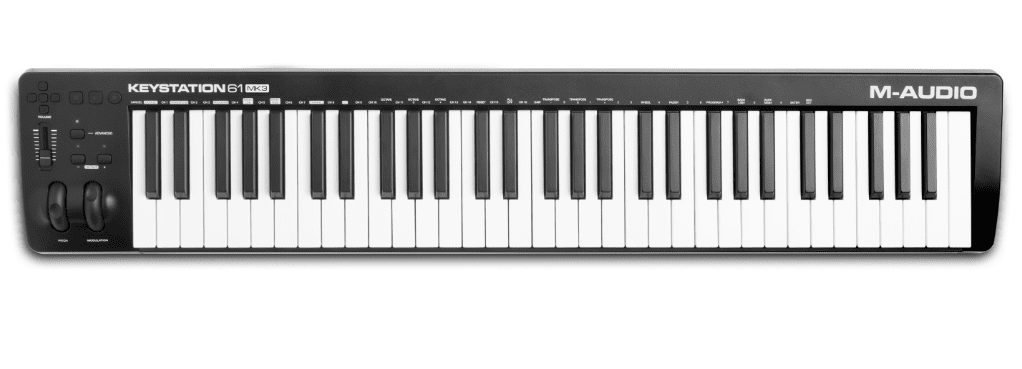
First Impressions – What’s the M Audio Keystation 61 MK3 All About?
You’re setting up a cramped desk at midnight, plugging your laptop into a keyboard and hoping it behaves – the Keystation 61 MK3 surprises: the 61 full-size velocity-sensitive semi-weighted keys actually feel good, and the controls make tracking fast. It’s USB-powered (no wall brick, handy but potentially limiting), with assignable pitch/mod wheels, octave buttons and 5-pin MIDI out, plus a bundle of Ableton Live Lite and MPC Beats to get you making music pronto. Want simple, reliable workflow? This might be it.
How Does It Feel? – My Take on Those Keys
When you set the Keystation 61 on a tiny desk for the first time, you almost expect it to feel toyish – but it doesn’t. The 61 full-size, velocity-sensitive semi-weighted keys give a surprisingly natural response, catching soft nuances and harder hits alike. They won’t replicate a grand piano’s hammer weight, so if you’re after full acoustic heft that could be a downside. Great for synths, controllers, and expressive playing; not a substitute for hammer-action pianos.
Built for Comfort
After a long tracking session you’ll notice how the layout keeps you comfortable – the pitch and mod wheels sit where your thumb expects them, the volume fader and transport buttons are fingertip-friendly, and the compact frame fits most rigs. Because it’s USB-powered and class-compliant you just plug in and play, which is awesome when you’re tired and don’t want to fuss. Ergonomic wheels, easy-access controls, and portable design make long sessions less painful.
Sensitivity Matters
While recording a late-night ballad you’ll feel the difference: the keys respond to subtle changes in touch, so your dynamics translate into the software more accurately. The Keystation’s velocity curve is lively, so you get expression without fighting the keyboard. Want more control? You can map the wheels and fader to tweak how sensitive things feel in your DAW. Touch sensitivity equals expressive playback – and that matters for believable parts.
In a crowded session you might switch patches fast – the ability to alter velocity curves in your host and assign controls changes everything. The Keystation gives you fully assignable controls and a 5-pin MIDI out, so you can drive hardware or tweak plugin response on the fly. If you plan to use an iPad, note you’ll need the Apple camera adapter to connect. Pro tip: tweak velocity curves in your software to match your playing style.
Product offers are temporarily unavailable.
Control Freak? – Why I Think You’ll Love the Features
Want hands-on control without the fuss? The Keystation gives you 61 full-size velocity-sensitive semi-weighted keys, intuitive transport and directional buttons, and a handy volume fader so your plugin tweaks feel real, plus it’s USB-powered and plug-and-play with no drivers required – you just plug in and play. Compact, bundles solid software, and even sports a 5-pin MIDI out for hardware heads, so your setup grows with you.
All the Buttons and Faders You Need
Want to stop hunting menus and actually play? The transport and directional buttons plus assignable controls put DAW navigation under your fingertips, and that volume fader gives you instant mix feel – you tweak without breaking flow. Map buttons and faders to plugins, save time, keep momentum and enjoy a workflow that actually helps your creativity.
Pitch and Mod Wheels that Actually Work
Think a wheel is just for show? These are ergonomically designed pitch and modulation wheels, smooth yet snappy, so bends and swells feel natural and expressive. They’re built to survive gigs and long studio days, not flop around like cheap toys.
Want to route those wheels exactly how you like? They send standard MIDI CC so you can assign them to filter cutoff, reverb depth, or any plugin parameter with advanced customizable mapping.
They respond to subtle nudges and return cleanly to center. Small, robust, and surprisingly expressive for live tweaking and intricate sound design.
Plug and Play? – The Simple Setup You’ll Appreciate
Because setup eats into your creative time, the Keystation’s appeal is that it’s genuinely plug-and-play. You plug the USB in and you’re mostly good to go – no drivers required on Mac or PC. It’s USB-powered so you don’t need a bulky PSU, which is great for gigging or tiny desks. Quick, painless, you can start playing in minutes.
Connecting to Your Gear
You hook it to your DAW over USB for virtual instruments, or use the 5-pin MIDI out to run hardware synths – nice and flexible. There’s a sustain pedal input plus transport and volume controls so you can ditch the mouse. Cables are simple, but if you’re routing to racks or mixers double-check adapters and MIDI wiring so nothing goes sideways mid-set.
iOS Compatibility – What’s the Deal?
If you want to play on an iPad you’ll like that the Keystation supports iOS, but it won’t magic-connect alone: you need the Apple Camera Connection Kit (sold separately) and since it’s USB-powered you may need a powered USB hub or the Lightning to USB 3 adapter with a power pass-through to keep it going. It works, but plan your adapters.
So what’s the trick? The Keystation is class-compliant so most iOS audio apps will see it without drivers, which is awesome. But some older adapters won’t supply enough juice, and cheap hubs can be flaky – that’s the annoying bit. If you’ve got a USB-C iPad you might get away with a direct cable, but otherwise grab a powered adapter. That usually fixes power weirdness and keeps your keys responsive.
Product offers are temporarily unavailable.
What’s Inside the Box? – The Software that Comes with It
The Keystation 61 MK3 ships with Ableton Live Lite, MPC Beats and a bundle of six AIR plug-ins, so you’ve got a DAW, a beat workstation and a堆 of virtual instruments right away. You can plug in and play – it’s USB-powered and plug-and-play (no drivers required), but note the iOS Camera Connection Kit is sold separately if you want iPad use.
The Must-Have Programs
Ableton Live Lite and MPC Beats are the headline apps included, giving you two very different, useful workflows – one for live/arrangement and one for beat-making. Xpand!2 and the AIR instruments fill in keys, electric pianos and synths so you don’t feel limited, and you’ll find yourself tweaking presets and actually finishing ideas faster than you thought, right?
Free Online Lessons? Seriously?
You get free online lessons from Skoove plus 60+ Melodics app lessons, so there’s actual guided learning tossed in with the hardware – not just a couple of lame PDFs. Want to get better without spending a ton? That’s the point.
Skoove delivers guided piano-style lessons and feedback, while Melodics focuses on short, app-based exercises for timing and finger control, so together they cover basics through groove work. They may require an account or registration to redeem the freebies, so don’t expect full lifetime access without signing up. They actually help you play better – real talk. So if you’re starting out or need a structured practice route, these lessons give you a legit head start.